Home / Imaging / Kyocera TASKalfa MA3500ci
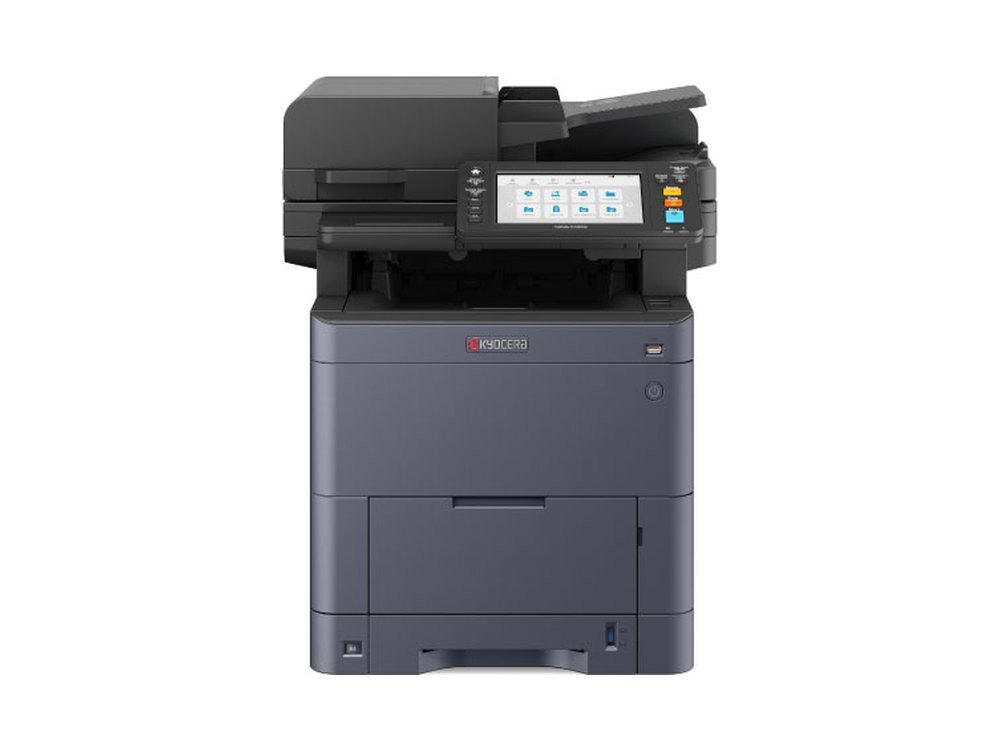
| Main Specifications | |
| Main Function | Copy, Print, Scan, Fax |
| Print Speed (A4)(Color) | 35 ppm |
| Platform | HyPAS |
| Panel Type | 7 Inch Touch Screen Panel |
| CPU | ARM Cortex-A9 Dual core 1.2GHz + ARM Cortex-M3 100MHz |
| Memory | Standard: 2,048 MB Max.: 3,072 MB |
| DP Type | 100 Sheets one-path duplex scan type |
| Dimension (WxDxH) | 480mm × 577.5mm × 575mm |
| Weight (including toner container) | 39kg |
| Warm-Up Time | 26 sec. |
| Paper Capacity - Standard | 250 Sheets (Casette) + 100 Sheets (MPT) |
| Paper Capacity - Maximum | 2,000 sheets (Main Unit + 550 sheets PF-5150 x3 + MPT) |
| Paper Size - Cassette | Max.: Folio (Legal) - Mini.: A6R (StatementR), 356[mm] x216[mm] - 140[mm] x 105[mm] |
| Paper Size - Option | Max.: Folio (Legal) - Mini.: A5R |
| Paper Size - MPT | Max.: Folio (Legal) - Mini.: A6R (StatementR), 356[mm] x216[mm] - 140[mm] x 70[mm] Banner Paper(1220 mm long and 216 mm wide, Simplex) |
| Paper Weight - Cassette | 60 - 220 g/m2 |
| Paper Weight - Option | 60 - 220 g/m2 |
| Paper Weight - MPT | 60 - 220 g/m2 |
| Duplex Printing | A4(Legal) - A6R(StatementE), 60 - 163 g/m2 |
| Output Capacity | Max. 250 Sheets face-down |
| Document Processor | 100 Sheets one-path duplex scan type |
| Power Consumption (Standard configuration) - Copy/Print Mode | 479.1W / 449.1W |
| Power Consumption (Standard configuration) - Stand-by Mode | 18.8W |
| Power Consumption (Standard configuration) - Energy Saver | 0.5W |
| Noise (ISO7779/ ISO9296) - Operating | 51dB(A) |
| Noise (ISO7779/ ISO9296) - Stand-by | 30dB(A) |
| Copy Functions (Standard) | |
| Copy Resolution | 600x600 dpi |
| First Copy Time (Mono/Color) | 6.1 sec / 7.2 sec |
| Paper Size | Max.: Folio (Legal) - Mini.: A6R (StatementR) |
| Multiple Copy | 1 - 999 |
| Print Functions (Standard) | |
| PDL | PCL6 (PCL XL / PCL 5c), KPDL3, XPS / OpenXPS, PDF |
| First Print Time (Mono/Color) | 5.7 sec / 7.0 sec |
| Print Resolution | 1200x1200 dpi |
| Encryption Communications | IPsec,HTTPS,LDAP over SSL,SNMPv3, FTP over SSL |
| Network Functions (Standard) | |
| Interface | 10/100/1000 BASE TX |
| Interface | USB 2.0 |
| AirPrint | Yes |
| Mopria | Yes |
| Fax & Scan Functions (Standard) | |
| Scan Speed (Mono / Color) A4 300dpi Simplex | 60/40 ipm |
| Scan Speed (Mono / Color) A4 300dpi Duplex | 100/80 ipm |
| Resolution | 300dpi×300dpi, 200dpi×200dpi (Default), 200dpi×100dpi 600dpi×600dpi, 400dpi×400dpi, 200dpi×400dpi 1200dpi×1200dpi (TWAIN driver, WIA driver) |
| File Format | TIFF (MMR/JPEG compression), JPEG, PDF (MMR/JPEG compression), XPS, PDF/A-1,PDF/A-2, PDF (High compression), Encrypted PDF, OPEN XPS, MS Office file (Option), Searchable PDF (Option) |
| Transmission Type | Scan to PC, Scan to FTP/ FTP over SSL, Scan to E-mail, Scan to USB, TWAIN Scan, WIA Scan |
| Number of continuously scanned pages (With DP installed) | Standard: 670 sheets (Color), 998 sheets (Monochrome) Maximum: 998 sheets *when optional memory is installed. |
| Image Type Mode | Text, Photo, Text + Photo, Light Text/Fine Line, OCR |
| Address Storage | 200 addresses (Common address list), 50 groups (Group address list) |
| Specifications as published by Kyocera Document Solutions India; subject to change by the manufacturer. | |
Compact design for easy installation: This compact device easily fits into tight spaces like stores, reception areas, and offices. It also has a silent mode feature, ensuring no operating noise to disturb you, even if it's placed next to your desk. With the IB-37 option, wireless LAN support allows for easy installation without the need for LAN wiring. Wi-Fi Direct enables quick connections with a PC or mobile device, making it simple to use the multifunction device, especially for temporary needs.
User-friendly and simple to use: To enhance visibility, we have minimized the number of colors utilized and simplified icons and graphics, enabling users to intuitively access crucial information. Additionally, the tilt mechanism allows for easy angle adjustment, ensuring the panel can be easily viewed and operated in various settings such as under a store counter or on a desk.
Mobile and cloud collaboration revolutionizes work processes: With the KYOCERA MyPanel app, you can easily control the multifunction device from your smartphone or tablet via Wi-Fi, even in a shared workspace. Additionally, the KYOCERA Cloud Connect app, part of the HyPAS system, allows for easy access to "Evernote" and "OneDrive for Business," enabling quick printing and sharing of documents.
Supplied through the authorised manufacturer channel with full warranty. Installation, network configuration and user handover are included.
AMC is available as AMC with Spares Coverage or as a service-only AMC, with scheduled maintenance, remote monitoring and genuine spare parts. We also service machines bought from other vendors.